Tiny
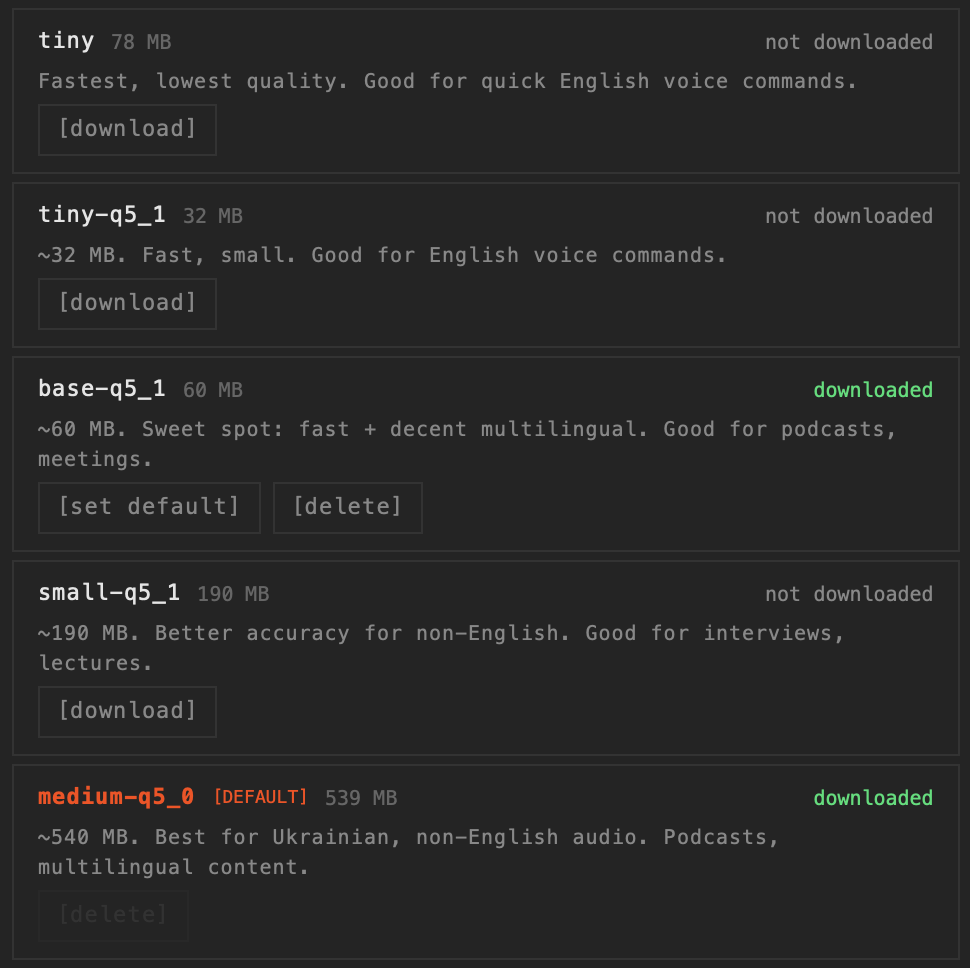
78 MBFastest, lowest quality. Good for quick English voice commands.
From ultra-fast voice note drafts to pinpoint accuracy for complex legal jargon. Choose the ideal model for your task, running 100% locally on your Mac's Neural Engine.
How Tscribe delivers private, high-performance transcription directly on your Mac.
AI models are downloaded once during your first setup. After that, Tscribe operates entirely offline without needing an active internet connection.
Tscribe leverages Apple's Neural Engine and Metal GPU architecture to deliver maximum processing speed with minimal battery impact.
Audio is processed directly inside your Mac's local memory. Your files and generated transcripts never leave your machine or touch a cloud server.
Find the right model for your specific transcription task.
Fastest, lowest quality. Good for quick English voice commands.
Fast, small. Good for English voice commands.
Sweet spot: fast + decent multilingual. Good for podcasts, meetings.
Better accuracy for non-English. Good for interviews, lectures.
Best for Ukrainian, non-English audio. Podcasts, multilingual content.
Same quality as large-v3 but 2× faster. Best overall accuracy.
Maximum accuracy. Slowest, but best for noisy/complex audio.
Select the best model based on your Mac's hardware setup.
Perfect for everyday voice notes and short meetings without overloading system memory.
Recommended:
Ideal for professional daily workflows, multi-speaker interviews, and noisy environments.
Recommended:
Unlocks uncompromised precision for complex audio, heavy accents, and multi-hour recordings in the background.
Recommended:
The honest answer for most people is Large-v3-turbo-q5_0. It reaches roughly the accuracy of the full large-v3 model at about twice the speed and a fifth of the disk footprint, and it runs comfortably on any Apple Silicon Mac with 16 GB of memory. Start there, and only move if it is too slow or too heavy for your machine.
Below that, the decision is a straight trade between three things: how long you are willing to wait, how much memory your Mac can spare, and how forgiving your audio is. Clean single-speaker English is easy and small models handle it well. A noisy three-person interview in a language other than English is where the larger models earn their size.
Clean English, one speaker, close microphone
Voice memos, dictated notes, a podcast recorded properly. Base-q5_1 (60 MB) is usually enough and returns a transcript almost instantly. Going bigger here mostly buys you punctuation, not words.
Meetings, lectures, two or three speakers
Room echo and overlapping speech start to cost you accuracy. Small-q5_1 (190 MB) is the practical floor, and Large-v3-turbo-q5_0 is noticeably better if you can spare the memory.
Non-English audio, including Ukrainian and other CEE languages
This is where small models fall apart fastest. Medium-q5 (540 MB) is the point where quality becomes reliable, and Large-v3-turbo-q5_0 is better still. Do not judge Tscribe's accuracy on a non-English file using Tiny — you are measuring the model, not the app.
Difficult audio: heavy accents, background noise, phone recordings
Use Large-v3 (3.1 GB) and accept that it is slow. If a recording is genuinely hard, no smaller model will rescue it, and the extra wait is cheaper than correcting the transcript by hand.
Most of the models here are quantised. Quantisation stores the model's weights at lower numerical precision, which makes the file dramatically smaller and the model faster to load and run, at a small cost in accuracy that is usually invisible on ordinary speech. Tiny-q5_1 is 32 MB against 78 MB for the unquantised Tiny, and Large-v3-turbo-q5_0 is 574 MB against 3.1 GB for the full large-v3. On a laptop, that difference decides whether a model is usable at all.
Transcription time depends on your chip, the model, and the length of the recording, so the only number that matters is the one you measure on your own Mac. The free trial exists precisely for this: it transcribes the first 30 seconds of any file with every model unlocked, so you can time the same clip through two or three of them and pick with evidence rather than guesswork. Test on your worst recording, not your best.
One thing that surprises people: the first transcription after launching is slower than the rest, because the model has to be loaded into memory. Subsequent files start immediately. Do not judge speed on the first run.
Models are downloaded once and stored on your Mac. You can add another from Settings → Models whenever you like, and delete any you no longer want to keep the disk space. The download is the only step that needs an internet connection — after that, everything runs offline, permanently. See the setup guide for the walkthrough.